
The Quick Read
We built a lightweight Google Drive cleanup utility to organize years of scattered company files without turning it into a manual admin marathon.
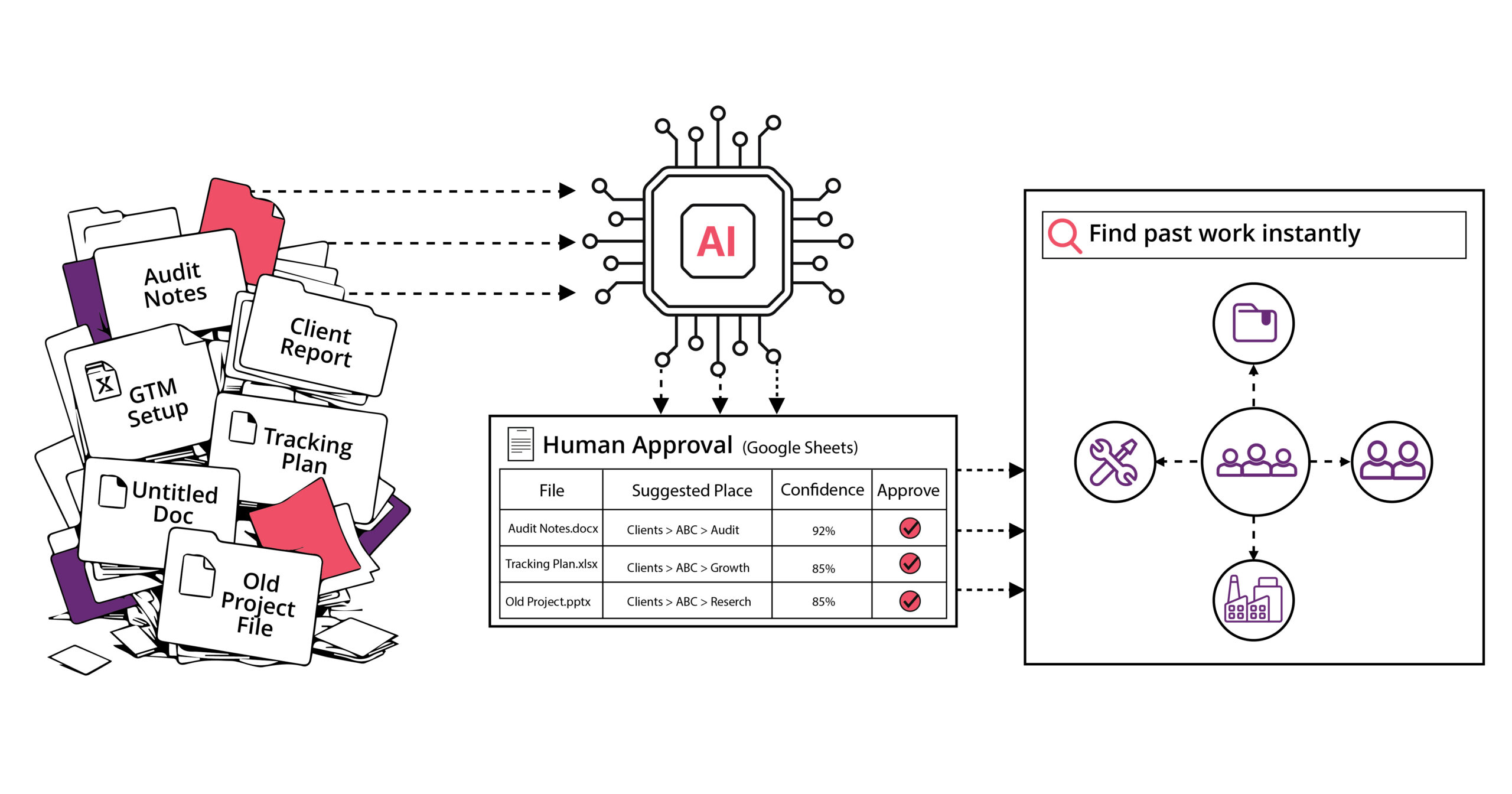
It uses fuzzy matching for obvious file-to-folder matches, Claude Haiku for the messier cases, and a Google Sheet approval layer so humans stay in control before anything moves.
The first full cleanup processed 3,291 files, moved 3,287 successfully, hit a 99.9% success rate, and cost around $0.50 per audit month to run.
We’ve open-sourced the utility here: https://github.com/marketlytics/gdrive-sorting-utility
Every company has that one place. The place where important documents go to disappear.
For some, it might be Slack, for others, it might be Notion and for many of us, it is Google Drive.
Our Google Drive had slowly become a very honest reflection of how consulting work actually happens, and the need for better Google Drive file organization became impossible to ignore.
Fast-moving projects, multiple clients, audit documents, tracking notes, implementation files, reports, old client folders, new client folders… and what not!
And, of course, a generous number of files named in ways only their original creator could understand.
The work and knowledge was there. The problem was finding it when we actually needed it. Some files were outside client folders, some were buried in old locations, and some had the client name hidden somewhere in the filename like a secret message.
So we decided to stop treating this as a “clean up Drive when someone gets time” problem. Because let’s be honest, nobody gets time.
We built a system instead. An internal Google Drive Intelligence Platform that automatically finds stray files, matches them to the right client folders, and prepares them for human review before anything moves.
Step One: Admit the Mess Was Bigger Than It Looked
The utility scanned stray files across our Drive structure and processed 3,291 unique files across audit iterations.
Out of those 3,291 files, 1,093 were matched through fuzzy logic, 545 more were matched through Claude AI, 353 new folder suggestions were created, and 1,298 remained unmatched because they were generic, unclear, or needed human context.
And after approval?
3,287 files were moved successfully.
That is a 99.9% move success rate and the AI cost? Around $0.50 per audit month.
Which, frankly, is less than the cost of thinking about cleaning Google Drive manually.
AI Helped, But It Didn’t Run the Show
This is where a lot of AI projects go wrong. They take a problem that simple logic can partly solve and immediately hand the whole thing to a model.
We did the opposite. The first pass used fuzzy matching.
Because if a file is called:
Ferguson Roofing – GTM Code Changes.gdoc
And there is already a folder called:
Ferguson Roofing
You do not need an AI model to have a philosophical moment about where the file belongs. You need good matching logic.
So the system first extracts the likely client name, cleans up noise like dates, domains, extensions, and business suffixes, and compares it against the client folder pool.
Fast. Cheap. Predictable.
That first pass alone handled 1,093 files with zero API cost.
Of course, Drive filenames are not always polite. Some are vague enough to look like they were named during a fire drill.
That is where AI came in, acting as an AI document sorting tool for the messier files. But even here, the model did not get unlimited freedom.
Instead of showing AI all 700 valid destination folders, the system narrowed the list to no more than 120 likely candidates per batch. Claude had to copy folder names exactly from the approved list, and every suggestion was validated against the real Drive folder list before being accepted.
The rule was simple: better to leave a file unmatched than confidently move it to the wrong place.
The Google Sheet Became the Control Room
The system does not move files the moment it finds a match.
Instead, it writes everything into a Google Sheet.
Each audit run creates a new tab where every file gets a row with its suggested destination, confidence level, reason, status, approval action, and manual override field.
The reviewer mainly sees three statuses:
MATCHED means the system found an existing client folder. NEW_FOLDER means the file likely belongs to a client that does not yet have a folder. UNMATCHED means the system could not confidently identify the client.
This is where the human layer matters.
A reviewer can spot a near-duplicate folder, recognize a client from context, archive a generic file, or override the suggestion completely through the manual_folder column.
So the AI handles the volume. The human protects the quality.
Built to Survive Real-World Runs
The utility does not try to process everything in one heroic run. Heroic runs are usually how internal tools break.
Instead, it runs as a GCP Cloud Function Gen2, triggered every 15 minutes across a 4-hour monthly window. Each run processes a small batch, writes results to the Google Sheet, and marks rows as processed using an is_processed column.
If one run fails, the next one continues from where it stopped. The mover is also idempotent, so already-moved files are skipped if the process is rerun.
Safe to rerun. No restart from zero. Exactly what you want from an operations tool.
Cleaner Folders Were Only the Beginning
At first glance, this looks like a Drive cleanup project. And yes, the folders are cleaner now.
But the more interesting part is what happens after the cleanup. Once client files are organised properly, they become a structured dataset we can build intelligence on.
This unlocks questions like::
- Which clients have we done GA4 migrations for?
- Which projects involved HubSpot and Salesforce attribution?
- Where have we worked on server-side GTM?
- Which ecommerce clients had CRO-related analytics work?
- Which past projects are similar to this new lead?
- Which team members have worked on a specific industry, tool, or market?
Now Google Drive is no longer just storage. It becomes a map of what the company knows.
What This Unlocks Next
One of the clearest next use cases is proposal intelligence. When a new prospect comes in, the team will be able to search past work and quickly find similar clients, tools, industries, and project types
Instead of relying on memory, a proposal can reference real past experience:
- “We have solved a similar attribution problem for a B2B SaaS client.”
- “We have handled a GA4 and BigQuery setup for an ecommerce team with a similar stack.”
Over time, this can evolve into a client knowledge graph: clients connected to projects, projects connected to documents, documents connected to tools, tools connected to team members, and clients connected to industries.
At that point, the team will be able to ask questions like:
- “What did we recommend for ecommerce clients using Shopify and GA4?”
- “Which team members have worked on attribution projects for B2B SaaS?”
- “What past audits should we review before onboarding this client?”
That is when internal knowledge stops depending on who remembers what.
A Drive sorting utility may not sound glamorous.
But when it processes 3,291 files, moves 3,287 successfully, keeps AI costs around $0.50 a month, and creates the foundation for a searchable client knowledge base, it becomes something more interesting.
It becomes the infrastructure for institutional memory.
And that is the bigger lesson here. Your company probably already has more knowledge than it thinks. The question is whether anyone can find it when it matters.
We have also open-sourced the utility so other teams dealing with messy Drive structures can use it, adapt it, and build on top of it.
If your agency’s Drive looks anything like ours did, this might be a good time to stop waiting for “someone to clean it up.” We have open-sourced the utility so other teams dealing with messy Drive structures can use it, adapt it, and build on top of it.