
Google Analytics is a very useful and profitable tool if used wisely and understand how it works. It has many features which are responsible for collecting data from your site, app or any digitally connected device, processes that data and outputs the reports.
Why you need to track time of day?
Sometimes it’s most important to understand google analytics traffic by hour. This way you will be able to see during which hours your site shows the highest traffic. By using google analytics hourly traffic reports you can set your marketing strategy to reach out more traffic.
How to track traffic by hour in Google Analytics?
Google Analytics does not contain a built-in feature that will show traffic according to the hours of the day, but you can create a custom report by yourself.
Here I will show you a method of doing this:
Create Custom Reports
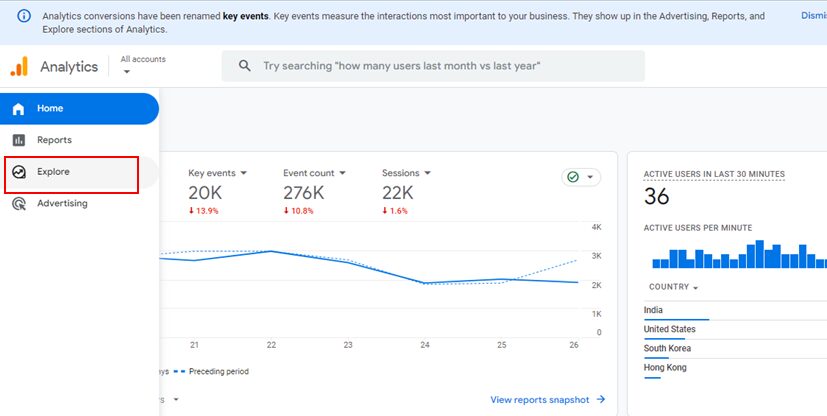
In order to create a custom report sign into your GA account and select explore tab.
Next, select free form report.
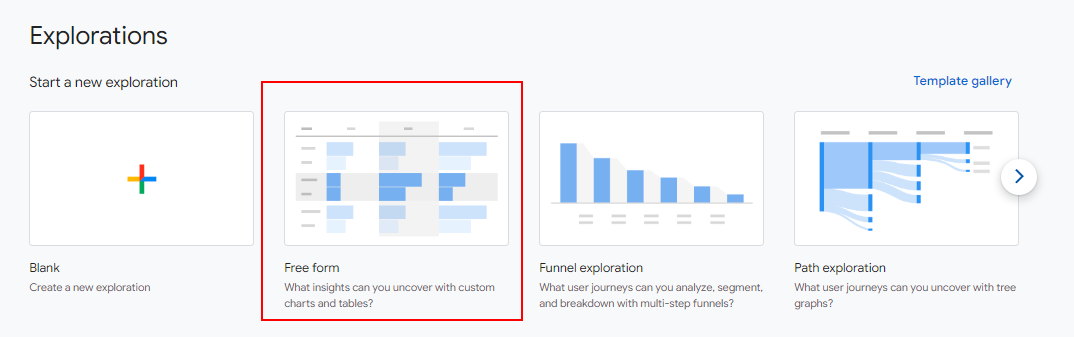
Select
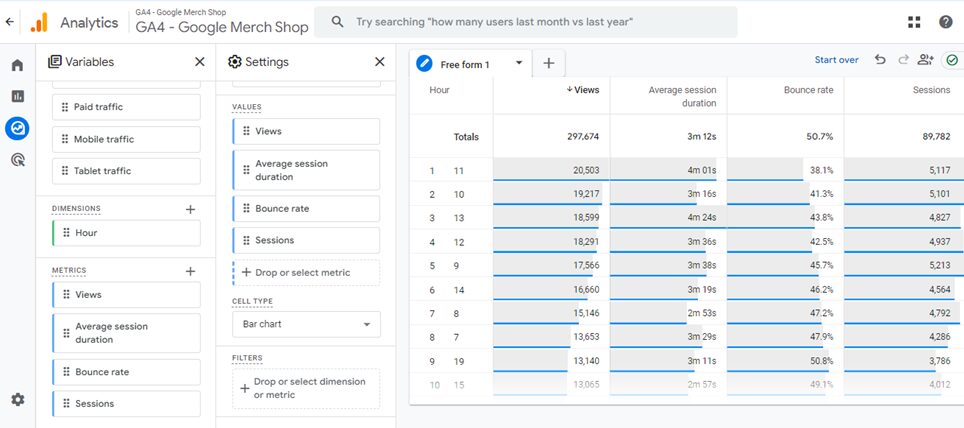
Dimension as ‘Hour’
Metrics as ‘pageviews’, ‘pages/session’,’Avg.session duration’, and ‘Bounce Rate’ in my case but you can select other metrics according to your need.
Your custom report will look something similar to the below screenshot.
If you have done the things correctly i hope you are getting reports the way you wanted to see.